Recover failed Stripe payments without turning into a billing engineer.

Your customers usually did not mean to churn. Their card just failed.

PayDam sends branded recovery emails, routes customers to Stripe Billing Portal to update payment, and shows which failed invoices came back.

Stripe stays your billing system  ·  No raw card data stored  ·  14-day trial on paid plans  ·  Cancel any time

PayDam.app / dashboard

The problem

Failed payments look like churn until you give customers an easy way back.

Stripe can keep retrying a failed charge, but the customer still needs a clear, trusted path back. The gap is usually customer communication: who sent the email, whether it looks like you, and whether your team can see what happened.

PayDam keeps Stripe as the billing system of record and adds the branded recovery workflow around it: customer emails, Stripe-powered recovery pages, and an invoice-level status view for your team.

Without PayDam

Stripe can send failed-payment emails and hosted recovery pages, and that is a useful baseline. But if you want branded multi-touch follow-up, recovery-specific engagement tracking, invoice-level status, and a focused queue for payments that still need attention, you end up stitching that workflow together yourself.
With PayDam

PayDam adds the customer-facing recovery layer around Stripe Smart Retries: branded emails, Stripe Billing Portal links, invoice-level visibility, and a dashboard for what recovered, what is still in progress, and what needs attention.

How it works

Connect Stripe. Send recovery emails. See what comes back.

No code required. Stripe keeps handling payment retries while PayDam handles the customer follow-up.

01

Connect Stripe

Authorize PayDam with Stripe Connect or a restricted API key. PayDam reads the events needed to detect failed invoices and keep status current.

02

Send recovery emails

When Stripe reports a failed payment, PayDam sends your recovery sequence. Emails use your brand, support identity, and a Stripe-powered recovery page.

03

See what recovered

Your dashboard updates as customers open, click, pay, or need help. Pause recovery on a specific invoice when support is already handling it.

Product preview

The two things PayDam makes easier

What your customer sees

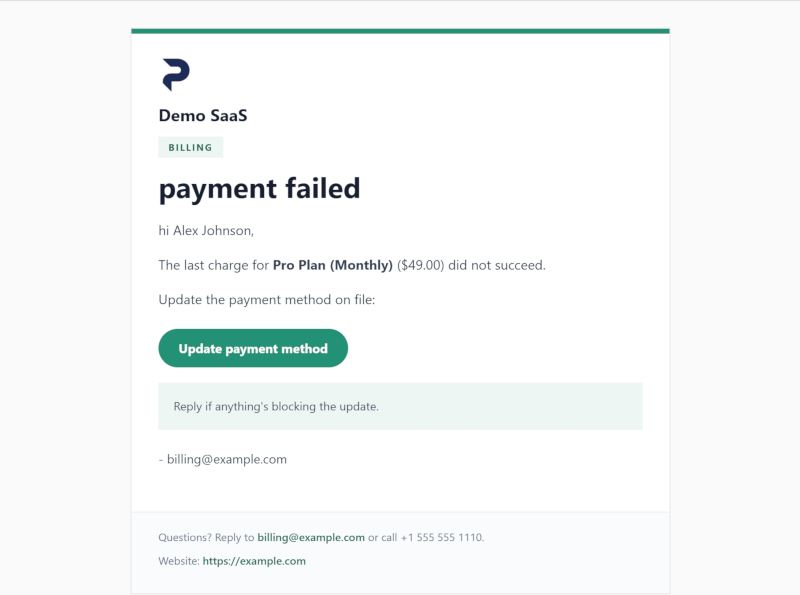
A branded email from your domain, and a Stripe-powered page to update their card. No PayDam logo. No raw card data on our servers.

Rendered branded recovery email with company logo and update payment method button

What your team sees

A focused dashboard for failed invoices, recovery status, and recovered value. Pause any invoice. Notes per customer.

Recovered
$4,820
23 invoices
Recovering
$1,240
7 in progress
Needs attention
$380
2 new today
Lost
$290
3 exhausted

Trust and security

Built for Stripe SaaS founders who care how their billing tools handle data.

Restricted Stripe scopes

Connect with Stripe Connect or a restricted API key. PayDam reads invoices, customers, and subscription status. We never request card data scopes.

No raw card data handled

Card updates happen through Stripe Billing Portal. Raw card numbers, CVCs, and bank details do not touch PayDam infrastructure.

Verified webhooks

All Stripe webhooks verified by signature. Public changelog and disclosure policy.

Pricing

Simple pricing. Start free, pay only on recoveries.

Founder-led beta pricing. Early customers keep their plan while their account remains active.
Free
$0/mo
+ 5% of recovered invoice value

For tiny SaaS or solo founders starting with no monthly base.

Start free
Starter
$19/mo
+ 4% of recovered invoice value

For teams ready to trade a small base fee for a lower success fee.

Start free trial
Scale
$99/mo
+ 2% of recovered invoice value

For multi-brand SaaS or agencies managing several Stripe accounts.

Start free trial

No seats. No MRR caps. No long-term contract. Success fee applies only when PayDam touched the failed invoice before recovery.

Compare

Not a retention suite. Not another billing system.

Stripe keeps retrying payments

Keep Smart Retries and Stripe as your billing system of record.

PayDam handles customer recovery

Send branded failed-payment emails, route customers to Stripe Billing Portal, and track invoice-level recovery.

Retention suites do more

Use a broader retention suite only if you also need cancellation flows, save offers, surveys, experiments, and churn analytics.

FAQ

Common questions

Does PayDam replace Stripe Smart Retries?
No. PayDam is designed to work with Stripe Smart Retries, not replace them. Stripe handles payment attempts. PayDam handles the customer follow-up around those attempts: emails, secure recovery pages, open and click tracking, and the status of each failed invoice.
Should I turn off Stripe's failed-payment emails?
Usually, yes. If you want PayDam to send the customer emails, turn off Stripe's native failed-payment customer emails so customers do not receive duplicate or mismatched reminders. Stripe can still handle retries while PayDam handles the branded recovery emails.
Does PayDam store my customers' card data?
No. PayDam never stores raw card numbers, CVCs, or bank account details. Customers use Stripe-powered pages when a failed payment needs attention. PayDam stores only the invoice, customer, email, status, and recovery data needed to send emails and show your reports.
How does the success fee get charged?
At the end of each billing period, PayDam totals the invoice value recovered after PayDam started a recovery sequence and applies your plan's success-fee percentage. Normal renewals are not counted. If Stripe recovers an invoice before PayDam sends a recovery email or otherwise touches the invoice, no success fee applies.
Will my customers know PayDam is involved?
No. Recovery emails use your company name, branding, logo, and support identity. Customers see your brand and use Stripe-powered billing pages when a failed payment needs attention.

Recover failed Stripe payments without turning into a billing engineer.

Connect Stripe, keep Smart Retries running, and let PayDam handle the customer emails and recovery tracking.

Create free account

14-day trial on paid tiers · No card needed to sign up · Cancel any time

Questions? Email support@paydam.app